
The playbook / Guides
Practical playbookDressmaker Game Online: A Practical Guide to Dressmaker Studio
Start with the kind of dressmaking you want
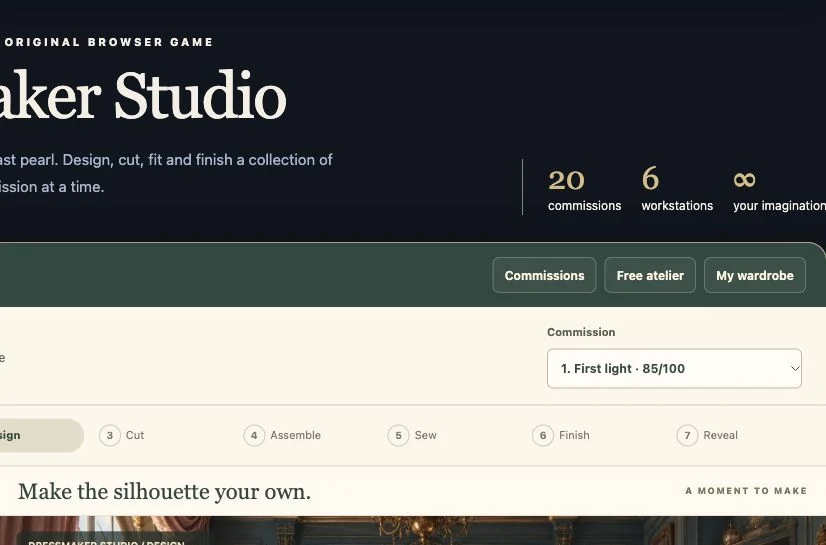
A dressmaker game can mean several different experiences. One player wants to choose a beautiful outfit, another wants to assemble a garment, and someone else wants the responsibility of running a shop. Those are related interests, but they produce very different sessions. Dressmaker Studio on Geometry Dash Gamer combines a small design workshop with a timing challenge. You measure a client, choose the garment details, cut the fabric, assemble the pieces, sew the seams and place the final decorations. The finished dress receives feedback for both the client brief and your timing.
This guide describes our original browser game, rather than the separate commercial product called Dressmaker. You do not need that product to play here, and progress does not transfer between them. The practical aim is simple: understand what each choice changes, finish your first order, and decide which detail to improve on the next attempt. You can open the workshop from the game link below and follow this guide alongside the controls.
Read the whole client brief before choosing fabric
Every commission has a named occasion, a client and a visible style brief. Early requests specify color, silhouette, print and finishing detail. Later commissions add sleeves, material, neckline and hem length. Read the actual brief on the left rather than assuming every selector is graded from the beginning. Details that are not requested leave you room to explore your own style. The current score target is visible below the request.
Begin at the measuring station. The three requested dimensions appear beside the tape sliders: bust, waist and dress length. Move each slider toward its requested value before opening the sketchbook. Approximate measurements reduce the fit contribution to your result. This is an abstract game system, not a tutorial for measuring a real person. Once you understand the request and dimensions, the design station becomes a calmer place to plan the garment.
Design an entire garment, not only its color
The upgraded design desk includes eight fabric colors, six silhouettes, four necklines, five sleeve styles, five materials, six prints, four finishing details and two hem lengths. Accent thread adds a separate color choice for belts and ornament. A Tea dress gives a simpler short outline, while Ball gown, Empire, Mermaid, Petal skirt and Tiered gown change the skirt construction. Compare the outline before adding a busy print.
Material and print have different jobs. Silk, Velvet, Linen, Tulle and Brocade affect the surface treatment; Plain, Wildflowers, Constellation, Pinstripe, Pearl dots and Damask affect its visible motif. Cap, puff, long and bell sleeves alter the shoulder and arm shape. A Sweetheart, V-neck, Square or Boat neckline changes the bodice edge. Use Turn the stand and Inspect details for a closer visual comparison, then return to the brief before committing to the cutting table.
Use the preview as a design workspace
The atelier scene shows the garment on a stand, with fabric rolls, a night window, and warm workshop colors around it. The dress changes immediately when you choose a different option. Before committing to an order, try two silhouettes with the same color. Then keep the silhouette and compare patterns. Changing one variable at a time helps you see what actually created the difference you liked.
You can also intentionally make a version that does not match the request. That is a reasonable way to explore, but the client score will reflect the mismatch. Creative preference and commission accuracy are separate goals. If you want to progress first, match the brief and unlock more orders. If you want to experiment, replay a completed order and use the Free atelier mode as a wardrobe sandbox. Your best recorded score should remain the result you are trying to beat.
Reach the sewing station through the workshop
Choose Cut this design when the garment choices are ready. Your selections become the working design for the construction stations. Complete the cutting path, bring the pieces to the stand, and fit each piece onto its translucent silhouette. Only then does Begin sewing open the needle challenge. This sequence matters: the sewing button is not a shortcut around unfinished fabric work.
A moving needle appears on the timing bar near the bottom of the atelier. The gold area marks the center target. Press Stitch, or use Space while the workbench has keyboard focus, as the needle approaches that area. Each deliberate press adds one stitch and a visible segment of the garment seam. The stitch counter shows how many remain. Once the required sequence is complete, choose Add the finishing touches to continue to the last station.
Follow the cutting path in order
The cutting table shows numbered markers on a simplified paper pattern. The next required point glows gold. Click that point, then follow the next highlighted point. You can also drag the scissors along the sequence. Clicking away from the current target records an off-path cut and reduces the cutting contribution. Do not rush toward a later corner while the earlier marker is still waiting; the path has a deliberate order.
With a keyboard, focus the workbench, use the arrows to move the crosshair, and press Space or Enter to cut at its position. The circular marker gives you a small tolerance around the target, so you do not need to land on a single pixel. Later commissions introduce another pattern piece and vary the layout. The station's continue button becomes available only after the required points have been completed.
Fit the loose pieces onto the dress stand
At assembly, the bodice and skirt begin away from their matching translucent silhouettes. Drag a piece by its central area toward the matching ghost on the stand, then release. It snaps into place when close enough. A misplaced release counts against assembly quality, but you can pick the piece up again and correct it. If the design has sleeves, fit those separate pieces as well before trying to continue.
Keyboard players can choose a piece from the Selected piece menu, focus the workbench and press Space to pick it up. Arrow keys move the crosshair and held piece. Press Space again to drop it. This is a positioning task, not another timed needle press. Take a moment to identify the matching shape before dragging across the workshop. The piece counter shows whether any bodice, skirt or sleeve is still unfinished.
Place details, press the hem and keep the design
At the finishing station, gold circular guides show where the commission needs its decorations. Click each guide to place the selected finishing detail. Keyboard users can move the crosshair with arrows and press Space. Later chapters ask for more placed details, so inspect the whole garment rather than stopping after the waist ornament. These placed elements are separate from the belt or trim already visible in the design preview.
Press the hem three times using the visible button, then present the dress. On the result screen you can give the creation a name, save it to My wardrobe or download its illustration. The wardrobe holds up to sixteen finished looks and can reopen a design in Free atelier for another variation. Saved wardrobe data follows the site's optional game-storage setting. A PNG export preserves the picture independently, but it is not a playable save or a real sewing pattern.
Build a repeatable stitching rhythm
Look at the gold zone rather than chasing the needle with your eyes across the entire bar. Let the moving marker come into that area and make a single press. Then release and wait for the next suitable pass. This gives your hand a clear job and reduces the temptation to press repeatedly after an imperfect stitch. You are improving a sequence of small decisions, not trying to win by making the most inputs.
When a press feels late, adjust the next one slightly earlier. Avoid changing your hand position, input device, and visual focus at the same time. A mouse click on Stitch can work well; Space can also feel more consistent for a keyboard player. Use whichever gives you a comfortable repeated action. The game does not require a special keyboard, a high refresh rate display, or a purchased accessory to complete an order.
Read all six parts of the result
The finished result separates client brief, fit, cutting, assembly, stitching and finishing. Design contributes up to thirty-five points, measurements ten, cutting fifteen, assembly ten, sewing twenty and finishing ten. A commission also requires at least seventy-five percent of its requested design choices to match. The visible approval threshold rises from sixty-five to eighty as you progress through the four chapters. A high technical score does not replace the brief requirement.
Use the breakdown to choose your next improvement. If the brief contribution is low, compare the requested options with your design. If cutting lost points, concentrate on the next gold marker instead of clicking ahead. If stitching is the weaker category, repeat the moving-needle phase with more deliberate presses. The score describes this browser game's rules. It is not a judgment of your real fashion taste, creativity or ability to sew actual clothing.
Progress through twenty commissions and four chapters
The order list shows the twenty workshop commissions and which ones are available. Later orders ask for more stitches and move the needle faster. They also introduce more requested design details, sleeve assembly pieces and additional placed decorations. The increasing input demand is the progression challenge; the workshop does not suddenly introduce a hidden currency or require a purchase to continue. Finish the current request, read its feedback, then move on when it is approved.
You can return to an earlier unlocked order through the selector. This is useful when you want a calmer timing bar or a quick replay. Do not assume that an earlier outfit is correct for a later client simply because the occasion sounds similar. Read the new combination each time. A garden event and a formal evening may use completely different requests under the game's commission rules.
Use pause, restart, and accessibility settings
Pause is available as a visible button, and P or Escape pauses when the workbench has focus. Take a break if the repeated timing starts to feel uncomfortable. Restart begins the current commission again, so use it when you deliberately want a fresh attempt. It is different from choosing the next approved order. The current commission number and brief help you confirm where you are before resuming.
Reduced motion removes decorative swaying and spark effects. The timing marker still moves because its position is necessary for the sewing mechanic. Music and sound effects have separate controls, with a shared volume slider. Audio begins after an interaction with the sound controls, as browser playback rules require. You can complete the game with sound off because the brief, timing target, stitch count, and result are all visible.
Keep progress expectations realistic
The game stores unlocked orders and best scores on the current device when game storage is enabled and available. The save message reports whether that succeeded. Private browsing, blocked storage, clearing site data, or switching browsers can change what is remembered. A saved score in one browser is not an account that follows you onto a second computer. Check the order selector after returning to see which records are present.
If storage is unavailable, you can still play and progress during the current visit. Avoid refreshing a private session if you are depending on that temporary state. There is no need to send a password or personal measurement to use the workshop. The garment choices are virtual, and the client brief does not ask for your body dimensions. Keep screenshots and personal design notes separately if you want a lasting record beyond the local score.
Try a focused fifteen-minute workshop session
Begin with two minutes of free experimentation in the first order. Compare silhouettes and observe how the trim sits at the waist. Next, restore the requested combination and complete one sewing round without trying to make every stitch perfect. Read the result carefully. For the second attempt, choose just one improvement: correct a missed detail or aim for a more consistent center press. This produces more useful feedback than changing everything.
Spend the remaining time on the next unlocked order or a replay of the first. Stop after a clear improvement rather than continuing until the activity feels tiring. If you enjoy precision timing, the arcade's runner and flight games offer a different style of input practice. If you prefer the design decisions, stay in the atelier and compare your own combinations. A good session can be creative, score focused, or simply relaxing.
Common questions before you play
Is this the commercial Dressmaker game? No. Dressmaker Studio is an independent original browser game on this website. For information about the separate commercial title, use its publisher's Steam listing. Does this workshop teach real sewing? It introduces simplified measurements, design, cutting, assembly and timing activities, but it does not teach safe machine use, fitting, pattern drafting, seam allowances, or textile handling. Real sewing requires appropriate instruction and equipment.
Can you play without music? Yes: every action has visible feedback. Can you unlock everything by changing the outfit alone? No: the score also includes fit, cutting, assembly, sewing and finishing. What should you do after a poor round? Read the brief-match and accuracy breakdown, correct the relevant problem, and retry. Start with the linked game page, keep the four requested details in view, and let the first commission teach you the rhythm before attempting the faster orders.
Sources and editorial note
Product reference: Dressmaker on Steam. This source identifies the separate commercial product; it does not describe our original browser game.
Prepared with AI assistance for Geometry Dash Gamer. The workshop instructions were checked against this site’s game implementation. No third-party product review or hands-on product test is implied.
Related: Cozy Fashion Games: Dress-Up, Sewing and Design Compared · Geometry Dash Practice on PC: Build a Consistent Timing Routine